Backend fundamentals — the full stack
Every web app is split into layers. The backend is the hidden layer that holds secrets, talks to databases, processes payments, sends emails, and enforces rules. Understanding this split is the key mental model of modern development.
The full-stack model
A web application has four fundamental layers. Every request from a user flows down through all of them:
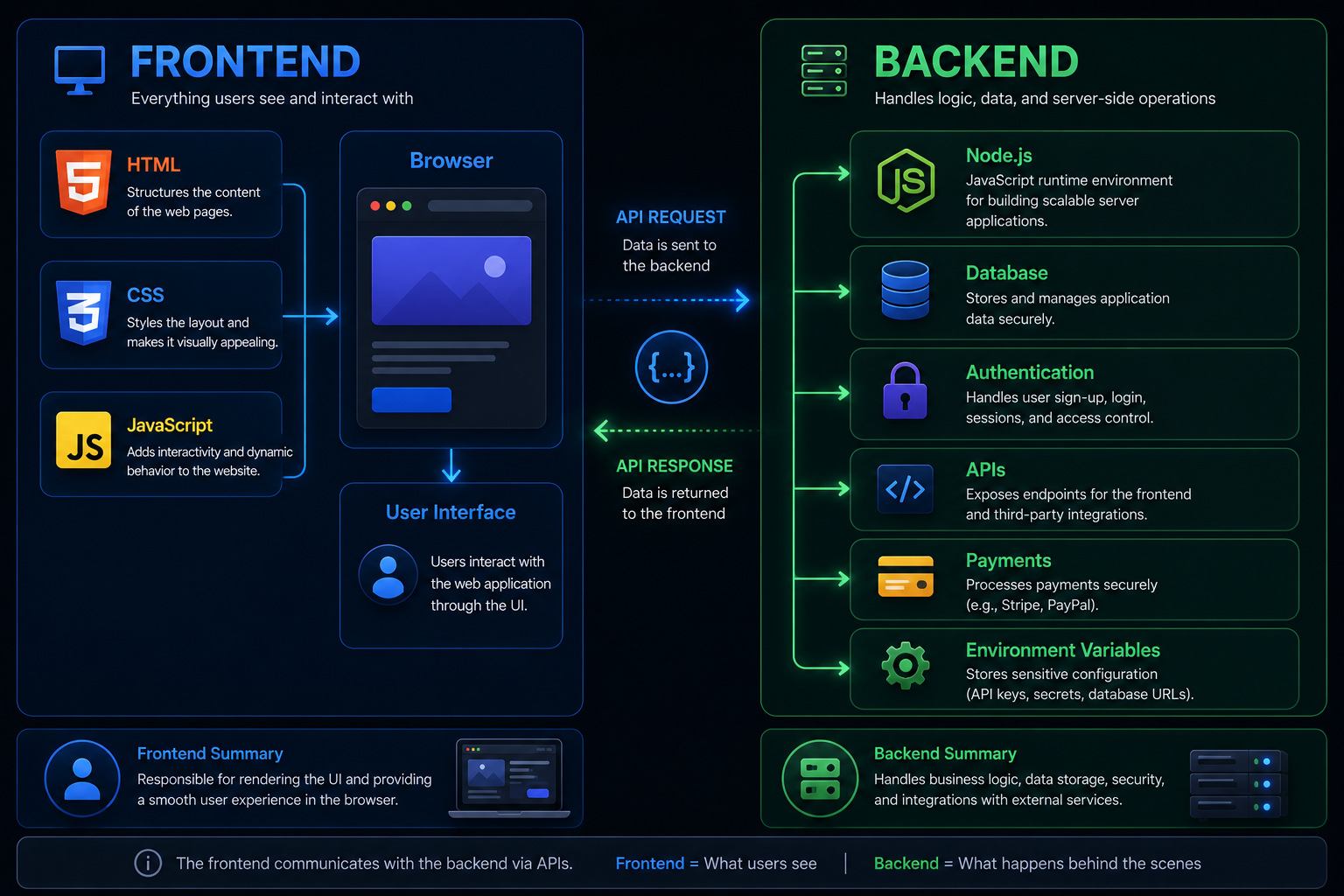
HTML, CSS, JavaScript. The user sees and interacts with this. Anything here is public — users can read all of it in DevTools.
React, Vue, or plain HTML/JS. Builds the user interface. Talks to the backend via API calls. Never has direct database access.
Node.js, Python, Go, etc. Receives requests, validates them, applies business logic, checks authentication, and talks to the database. Secrets live here.
PostgreSQL, MySQL, SQLite, MongoDB. Stores all persistent data — user accounts, posts, orders, everything. Never directly accessible from browsers.
Why users never touch the database directly
This is the most important thing to understand about web security: the database is never exposed to the internet. Users talk to your backend, and your backend talks to the database. The backend is the gatekeeper.
Authentication
The backend checks whether the user is logged in before running any database query. Without this check, anyone could request any data.
Authorization
Even if you're logged in, the backend checks whether you have permission. Users can only see their own data, not everyone else's.
Validation
The backend validates all input before it touches the database. This prevents SQL injection, oversized inputs, and malformed data.
Business logic
Complex rules — "only allow purchase if stock > 0 and payment verified" — live in the backend, not the browser where users could bypass them.
What the backend actually does
When a user submits a form or clicks something that needs data, here's the sequence:
Express — the most common Node.js server framework
Express is a minimal Node.js framework for building web servers and APIs. It handles routing (which code runs for which URL), middleware (code that runs on every request), and response sending.
import express from 'express';
import 'dotenv/config';

const app = express();
app.use(express.json()); // Parse JSON request bodies

// GET /api/users — return list of users
app.get('/api/users', async (req, res) => {
  const users = await db.query('SELECT id, name, email FROM users');
  res.json(users);
});

// POST /api/users — create a new user
app.post('/api/users', async (req, res) => {
  const { name, email } = req.body;

  if (!name || !email) {
    return res.status(400).json({ error: 'name and email required' });
  }

  const user = await db.query('INSERT INTO users ...', [name, email]);
  res.status(201).json(user);
});

app.listen(process.env.PORT || 3000, () => {
  console.log('Server running on port 3000');
});
Three patterns to notice: routes define the URL + method, handler functions receive req (request) and res (response), and res.json() sends the response as JSON.
Middleware — code that runs on every request
Middleware is a function that runs before your route handler. It's used for things every route needs: parsing JSON, checking authentication, logging, adding security headers.
// Middleware function — runs before protected routes
function requireAuth(req, res, next) {
  const token = req.headers.authorization?.replace('Bearer ', '');

  if (!token) {
    return res.status(401).json({ error: 'Authentication required' });
  }

  try {
    req.user = jwt.verify(token, process.env.JWT_SECRET);
    next(); // Continue to the route handler
  } catch {
    res.status(401).json({ error: 'Invalid token' });
  }
}

// Apply to a specific route
app.get('/api/profile', requireAuth, (req, res) => {
  res.json({ user: req.user });
});
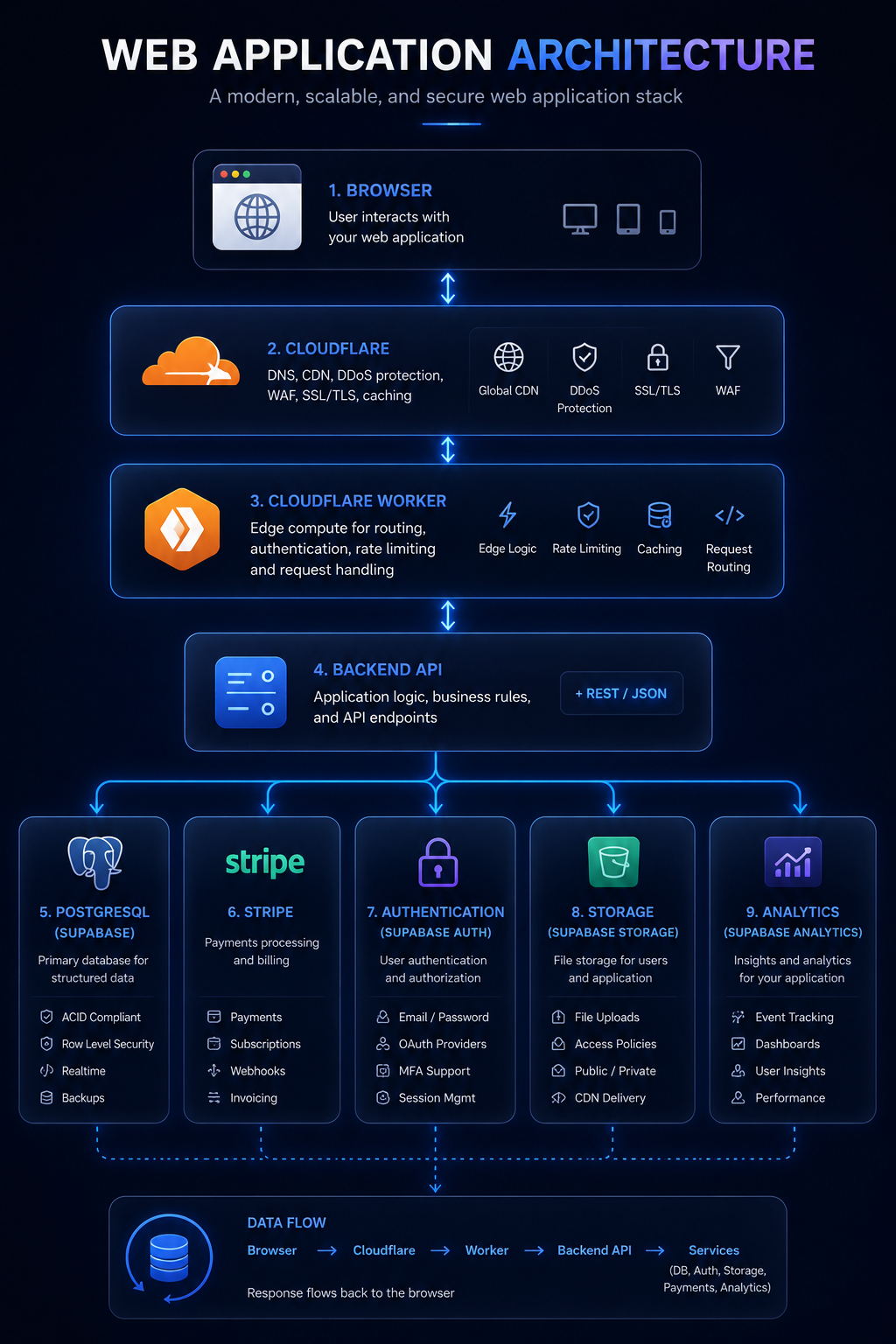
Modern web application architecture
Real production apps add more layers between the browser and the database — CDN, edge workers, auth providers, payment processors, and analytics all live at different points in the stack.
Where the backend runs
Your Express server needs to run somewhere. In development, it runs on your laptop on a port like 3000. In production, you deploy it to a hosting platform:
- Railway — deploy a Node.js server from a GitHub repo. Set environment variables in the dashboard. Gets a public URL. Scales automatically.
- Fly.io — containerized deployment, good for more complex apps
- Render — similar to Railway, free tier available
- Cloudflare Workers — not Express-compatible, but a different serverless model that runs at the edge globally
The database runs separately from your backend. PostgreSQL databases are typically hosted on Railway, Supabase, Neon, or a VPS — not on the same server as your Node.js code.