How the internet actually works
Most tutorials skip this. Before you write a single line of code, understand what's really happening when a browser loads a page — from the moment you press Enter to the pixel on your screen.
What happens when you type a URL
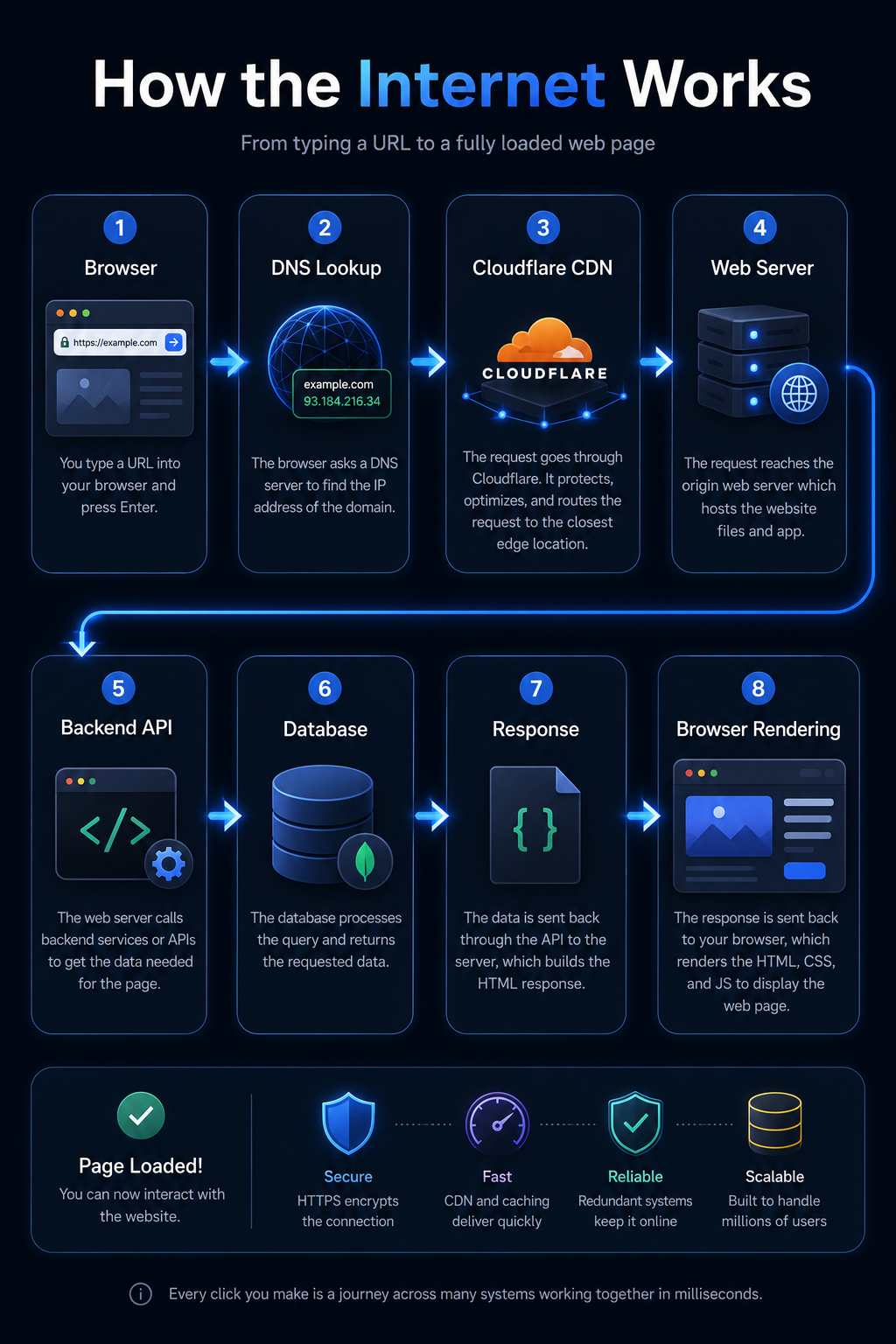
When you type https://webgrade.org and press Enter, a chain of events fires in under a second. Most people think the browser "just loads the website." Here's what's actually happening:
You type a URL
The browser reads https://webgrade.org. It sees the protocol (https), the domain (webgrade.org), and an implicit path (/).
DNS lookup
The browser doesn't know where webgrade.org lives. It asks a DNS server: "What is the IP address for this domain?" The DNS server responds with something like 104.21.45.6.
TCP connection
The browser opens a connection to that IP address on port 443 (HTTPS). This is a TCP handshake — both sides agree they're ready to communicate.
TLS handshake
Because the URL uses https://, the browser and server negotiate encryption. This is what the padlock in your address bar represents. All data sent after this point is encrypted.
HTTP request sent
The browser sends an HTTP GET request asking for the page. It includes headers — metadata like which browser you're using, what languages you speak, and any cookies from previous visits.
Server processes the request
The web server receives the request and decides what to return. For a static site this is straightforward — serve the HTML file. For a dynamic app, the server might query a database and generate the HTML on the fly.
HTTP response received
The server sends back an HTTP response — a status code (200 means OK), response headers, and the HTML content of the page.
Browser renders the page
The browser reads the HTML and starts building the page. When it hits a <link> for CSS or a <script> tag, it fires more requests to fetch those files. Once everything loads, the page appears on screen.
Clients and servers
The internet is built on one simple relationship: clients ask, servers respond.
Client
Any device that makes a request. Your browser is a client. So is a mobile app, a terminal running curl, or another server calling an API. Clients initiate communication.
Server
A computer that listens for requests and sends responses. A web server stores files and returns them when asked. An API server runs code and returns data. Servers wait — they don't reach out.
This distinction matters because it explains why you can't run certain code in the browser. A browser is a client — it can't directly connect to a database or read files from your hard drive (by design, for security). That's why backend servers exist.
HTTP and HTTPS
HTTP (HyperText Transfer Protocol) is the language browsers and servers use to communicate. Every request and response follows the same structure.
An HTTP request has:
- A method — GET (fetch data), POST (send data), PUT (update), DELETE (remove)
- Headers — metadata like Content-Type: application/json or Authorization: Bearer token
- An optional body — data sent with POST/PUT requests (like a form submission)
An HTTP response has:
- A status code — a number telling you what happened
- Response headers — metadata from the server
- A body — the HTML, JSON, image, or whatever was requested
| Code | Meaning | When you see it |
|---|---|---|
| 200 | OK | Request succeeded, response contains the data |
| 301 | Moved Permanently | Page has a new URL, browser should go there instead |
| 400 | Bad Request | You sent invalid data — missing field, wrong format |
| 401 | Unauthorised | You need to log in or provide a valid token |
| 403 | Forbidden | Authenticated but not allowed — wrong permissions |
| 404 | Not Found | The URL doesn't exist on this server |
| 500 | Internal Server Error | The server crashed — bug in the backend code |
HTTPS is HTTP with encryption layered on top via TLS. The data sent between browser and server is encrypted so no one on the network can read it. Always use HTTPS — modern browsers warn users when a site is HTTP-only.
DNS — the internet's phone book
Computers communicate using IP addresses — numbers like 104.21.45.6. Domains like webgrade.org are human-readable names that map to those numbers. DNS (Domain Name System) is the global system that translates one to the other.
Browser checks its cache
Your browser remembers recent DNS results. If you visited the site recently, it skips the lookup entirely. This is why DNS changes take time — cached results stick around.
OS checks its cache
If the browser doesn't have it, your operating system checks its own DNS cache.
Query sent to resolver
Your ISP (or a public resolver like 1.1.1.1) receives the query: "What's the IP for webgrade.org?"
Resolver works through the hierarchy
Root servers → TLD servers (.org, .com, etc.) → authoritative nameservers for the domain. The authoritative nameserver is the one you configure in Cloudflare or your domain registrar.
IP returned, cached
The resolver returns the IP address and the browser caches it for the TTL (Time To Live) duration — usually 5 minutes to 24 hours.
IP addresses and domains
Every device connected to the internet has an IP address. There are two versions:
IPv4
Four numbers separated by dots: 192.168.1.1. About 4.3 billion possible addresses — we ran out, which is why IPv6 exists.
IPv6
Eight groups of four hex digits: 2001:0db8:85a3::8a2e:0370:7334. 340 undecillion addresses. Not running out any time soon.
Domains are leased, not owned. You register yourdomain.com from a registrar (Namecheap, GoDaddy, Cloudflare) and pay yearly to keep it. If you stop paying, it becomes available to anyone. The DNS records on your domain are what actually connect it to servers — an A record points to an IPv4 address, a CNAME record points to another domain name, an MX record points to a mail server.
What browsers actually do
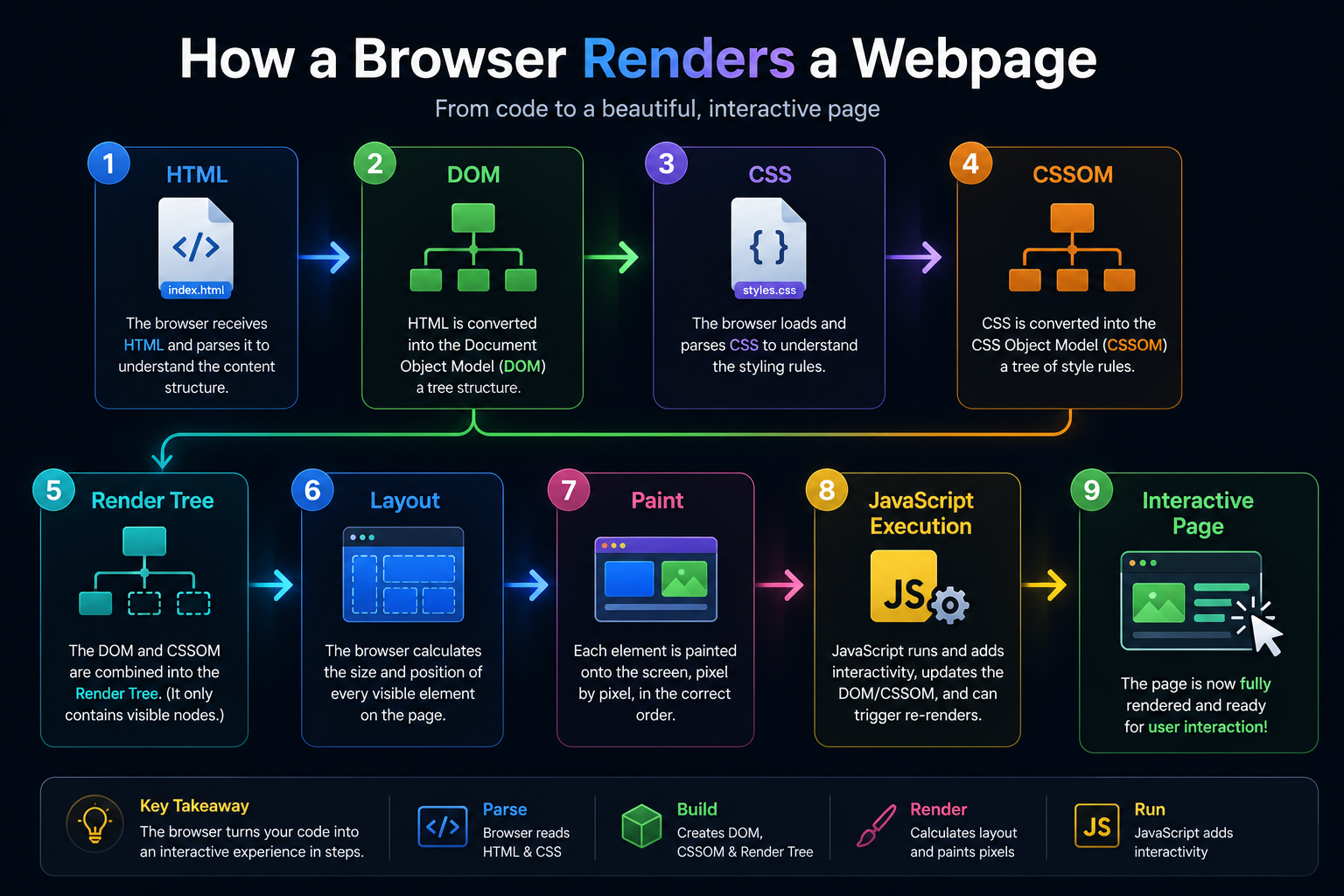
A browser isn't just a window that "shows websites." It's a complex engine that does multiple jobs at once:
- Networking — Handles DNS, TCP, TLS, HTTP. Downloads HTML, CSS, JS, images, fonts in parallel.
- HTML parsing — Reads the HTML and builds a tree structure called the DOM (Document Object Model). This is what JavaScript manipulates with document.querySelector().
- CSS parsing — Reads stylesheets and builds the CSSOM (CSS Object Model). Combines with the DOM to produce the Render Tree.
- Layout — Calculates exactly where every element sits on screen based on the Render Tree.
- Paint & Composite — Draws pixels to the screen. Layers are composited (stacked in order) and displayed.
- JavaScript engine — Runs JS code, which can modify the DOM, make further HTTP requests, and respond to user events.
Cookies, sessions, and local storage
HTTP is stateless — each request is independent. The server has no memory of previous requests. To remember things (like that you're logged in), browsers use storage mechanisms:
Cookies
Small pieces of data the server tells the browser to store. Sent automatically with every future request to that domain. Used for authentication sessions, preferences, and tracking.
localStorage
Browser-side storage that persists after the tab closes. Never sent to the server — only available to JavaScript on the same domain. Used for user preferences, cached data.
sessionStorage
Like localStorage but cleared when the tab closes. Good for temporary state during a single browsing session.
Session (server-side)
The server stores data about you and gives you a session ID in a cookie. Each request sends the ID so the server can look up who you are. More secure than storing sensitive data in the browser.
What this means for building websites
Understanding this chain changes how you think about every decision you make as a developer:
- Why you need HTTPS — unencrypted requests expose user data on shared networks
- Why static sites are fast — no server processing, files served directly from a CDN close to the user
- Why API calls can be slow — each one is a full HTTP round trip, sometimes cross-continent
- Why caching matters — serving a cached response skips DNS, connection, and server processing
- Why "it works on localhost" doesn't mean it works in production — different DNS, different TLS, different network conditions